Posts

Showing posts with the label paragraph

Microsoft Word 2010 Lesson- 1
Image
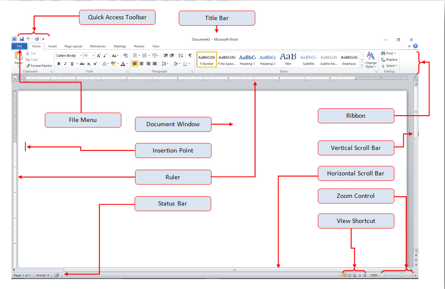
Microsoft Word 2010  Home Tab Lesson-1 Introduction :- Microsoft word is a word processor software developed by Microsoft in 1983. It is the most commonly used word processor software. It is used to create professional quality documents, letters, reports, resumes, etc and also allows you to edit or modify your new or existing document. The file saved in Ms Word has .docx extension. It is a component of the Microsoft Office suite, but you can buy it separately and is available for both Windows and macOS. The latest version of Ms Word is 2019. In this article we will learn the features of Ms Word, but first we learn how to open Ms Word? How to open Microsoft Word 2010   Method 1                                              Method  2 1.Start button                            ...

WordPad in English

Image
Word Pad  Introduction :- If you are a greenhorn in the computer field, then you need to learn about Word Processor. The best program to start with is Microsoft WordPad. A word processor is a program used to process, format, and store documents like letters, memos, reports, curriculum vitae and many more. It is also capable of producing a print out of the results.Though WordPad is rarely used as people use the latest and improved Microsoft Office, this should be your best bet if you want to learn about Microsoft Word fast.Another good thing about WordPad is that it comes embedded with the operating system.So you don’t have to spend even a single cent if you already don’t have Microsoft Word installed on your computer. How To Open WordPad                      Method 1                                         ...

What is WordPad - WordPad क्या है

Image
 What is WordPad - WordPad क्या है WordPad एक text-editor है, जो  Notepad  से कुछ ज्यादा लेकिन MS Word  से कुछ कम विशेषताओ के साथ डॉक्युमेंट बनाने में सहायक है. WordPad Windows  के हर संस्करण मे सम्मिलित होता है. WordPad  डॉक्युमेंट में कई तरह कि formatting की जा सकती है. WordPad की विंडो कुछ इस प्रकार की दिखाई देती है. यह Layout ‘Windows 7’ Operating System में दिखाई देती है, इसलिए हो सकता है  आप जब अपने कम्प्युटर मे WordPad को open कर  देखें तो आपको WordPad  विंडो कुछ अलग दिखाई दे.  इस बात से कोई ज्यादा फर्क नही पडता  है  हाँ ग्राफिक्स में तथा कुछ विशेषताओ का अंतर हो सकता है. MS WordPad को Open करने की विधियाँ विधि 1. 1. सबसे पहले “Windows Start Button” पर क्लिक करें. यह आपको अपने कम्प्युटर window में नीचे बांयी ओर मिलेगा. इस बटन कि दिखावट आपके ऑपरेटिंग सिस्टम के संस्करण पर निर्भर करती है, क्योंकि “Windows” के हर संस्करण में इस बटन की दिखावट अलग‌-अलग है. 2. इसके बाद आपको “All Program” पर क्लिक करना है जो आपको नीचे ‘Menu Bar...