Posts

Showing posts with the label edge educations

Microsoft Excel 2010 Home Tab Lesson-1

Image
Microsoft Excel 2010  Home Tab Lesson-1 MS EXCEL 2010 LAYOUT Introduction:- Microsoft Excel Starter 2010 is a spreadsheet program designed for everyday tasks such as setting up a budget, maintaining an address list, or keeping track of a list of to-do items. ... If you find that you want more features, you can upgrade to Excel 2010 right from Excel Starter 2010. Total Column-16384 Total Row-1048576 1 Column+1Row=1Cell Default Row Height=15 Default Column Width=8.43 Method 1                                             Method  2 1.Start button                                        1.Start button 2.All Programs                                      2.All Programs 3.Ms Excel 2...

Ms Word 2010 View Tab Lesson -9

Image
Ms Word 2010  View Tab Lesson -9 View: - The View tab enables you to switch between Normal or Master Page, and Single Page or Two-Page Spread views.This tab also gives you control over showing boundaries, guides, rulers, and other layout tools, zooming the size of your view of the publication, and managing Publisher windows you have open. Document Views This tab provides commands previously found in the View menu and Window menu. Read Mode - In 2010 this was called Full Screen Reading. Maximises the Word window on the screen and removals all toolbars etc to allow easy reading. Print Layout - Displays the document as it would appear if printed and is the default view. Web Layout - Displays the document as it would appear as a web page. Outline - Displays the document as an outline is displays the Outlining contextual tab. Draft - Displays the document in draft mode allowing for quick editing. When using this view certain aspects of the document are not visible, for example any he...

Ms Word 2010 References Tab Lesson -6

Image
Ms Word 2010  References Tab Lesson -6 References:- You can add a footnote to your document from the References tab. It contains resources for researchers and anyone in the professional field. The References Tab allows you to now create a table of contents, footnotes, citations, cross-references, select MLA or APA or ISO formats and so on.  Table of Contents Table of Contents:- Create Table of Contents The following will help you to create Table of Contents in your Microsoft Word using various levels of headings. Step 1-  Consider a document having different levels of headings. Step 2-   You can insert a table of content anywhere in the document, but the best place is always at the beginning of the document. So bring your insertion point at the beginning of the document and then click the References tab followed by the Table of Content button; this will display a list of Table of Contents options. Step 3- Select any of the displayed options by simply clicking o...

Microsoft Word 2010 Lesson- 1

Image
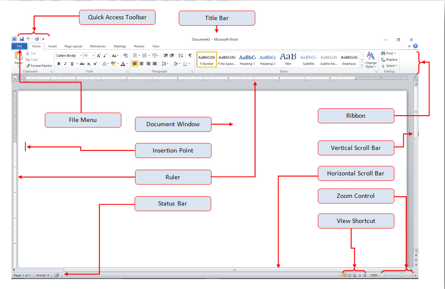
Microsoft Word 2010  Home Tab Lesson-1 Introduction :- Microsoft word is a word processor software developed by Microsoft in 1983. It is the most commonly used word processor software. It is used to create professional quality documents, letters, reports, resumes, etc and also allows you to edit or modify your new or existing document. The file saved in Ms Word has .docx extension. It is a component of the Microsoft Office suite, but you can buy it separately and is available for both Windows and macOS. The latest version of Ms Word is 2019. In this article we will learn the features of Ms Word, but first we learn how to open Ms Word? How to open Microsoft Word 2010   Method 1                                              Method  2 1.Start button                            ...